Getting into your account.

Everything you need to find your purchase, set your password, and reach the right person if something isn’t working. Most questions are answered in under a minute.

Getting into your account

When you buy, each product sends its own email with a link to set your password. Click any one of those emails — the same account opens all of them.

  1. Find the email

    Look for a message from hello@mail.gracenajean.co. The subject line will confirm what you bought.
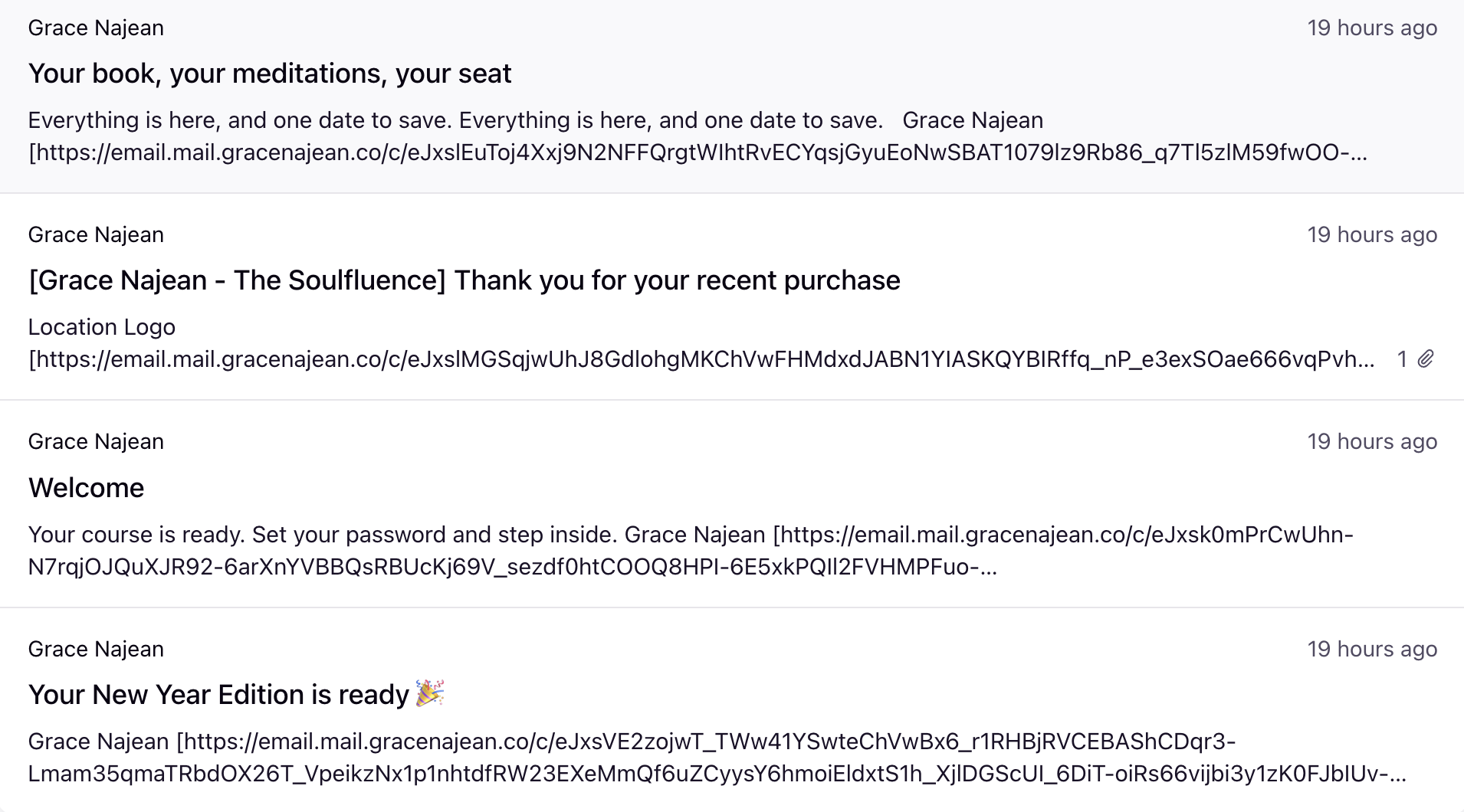
    Screenshot of the email in your inbox
    The email arrives within a few minutes of purchase.
  2. Click “Set Your Password”

    The email contains a single button. Click it and you’ll land on a page asking you to choose a password.
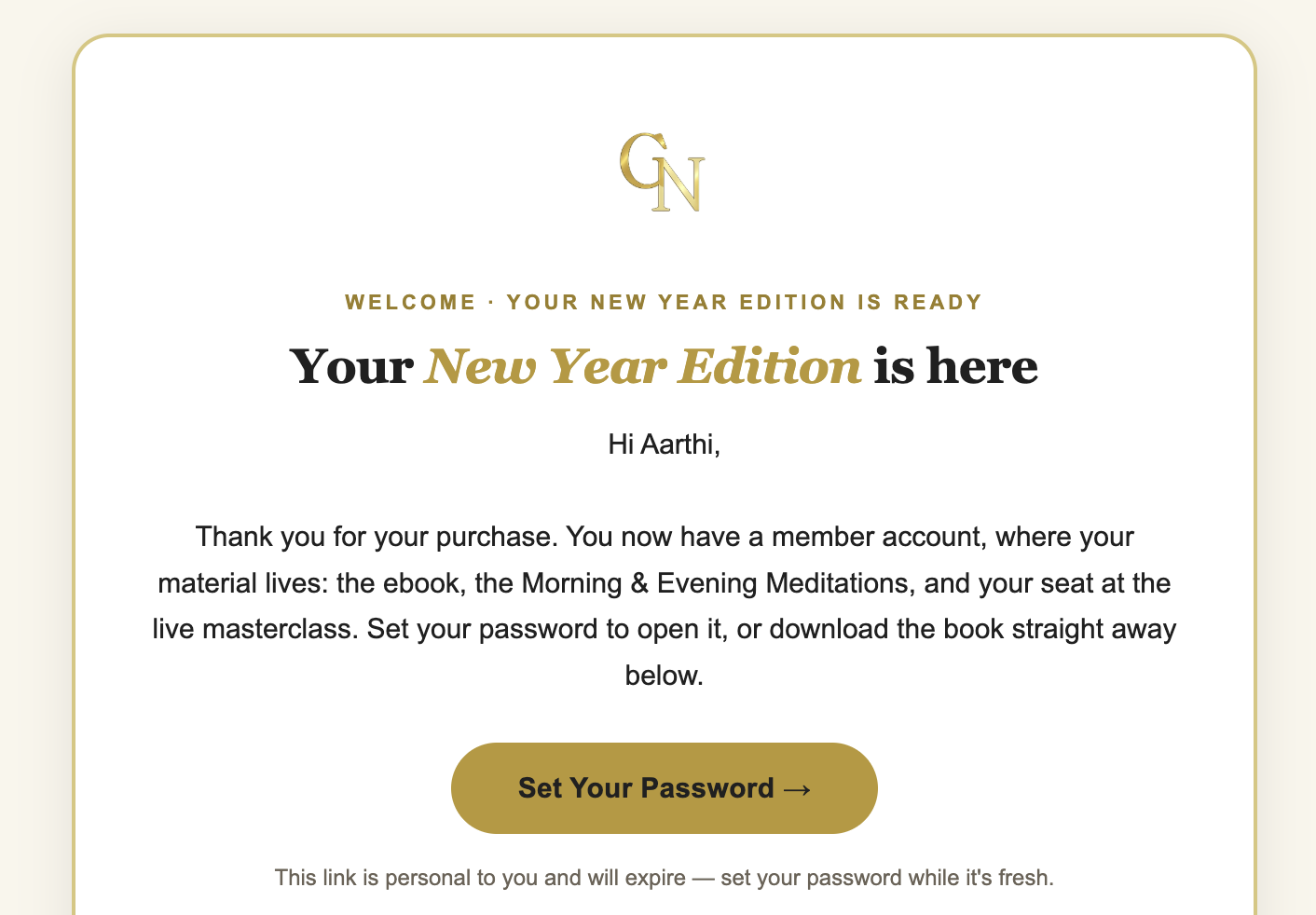
    Screenshot of the gold Set Your Password button
    This button is personal to you and expires after 24 hours.
  3. Choose your password

    Enter a password you’ll remember, then confirm it. That’s the last setup step — you won’t be asked again.
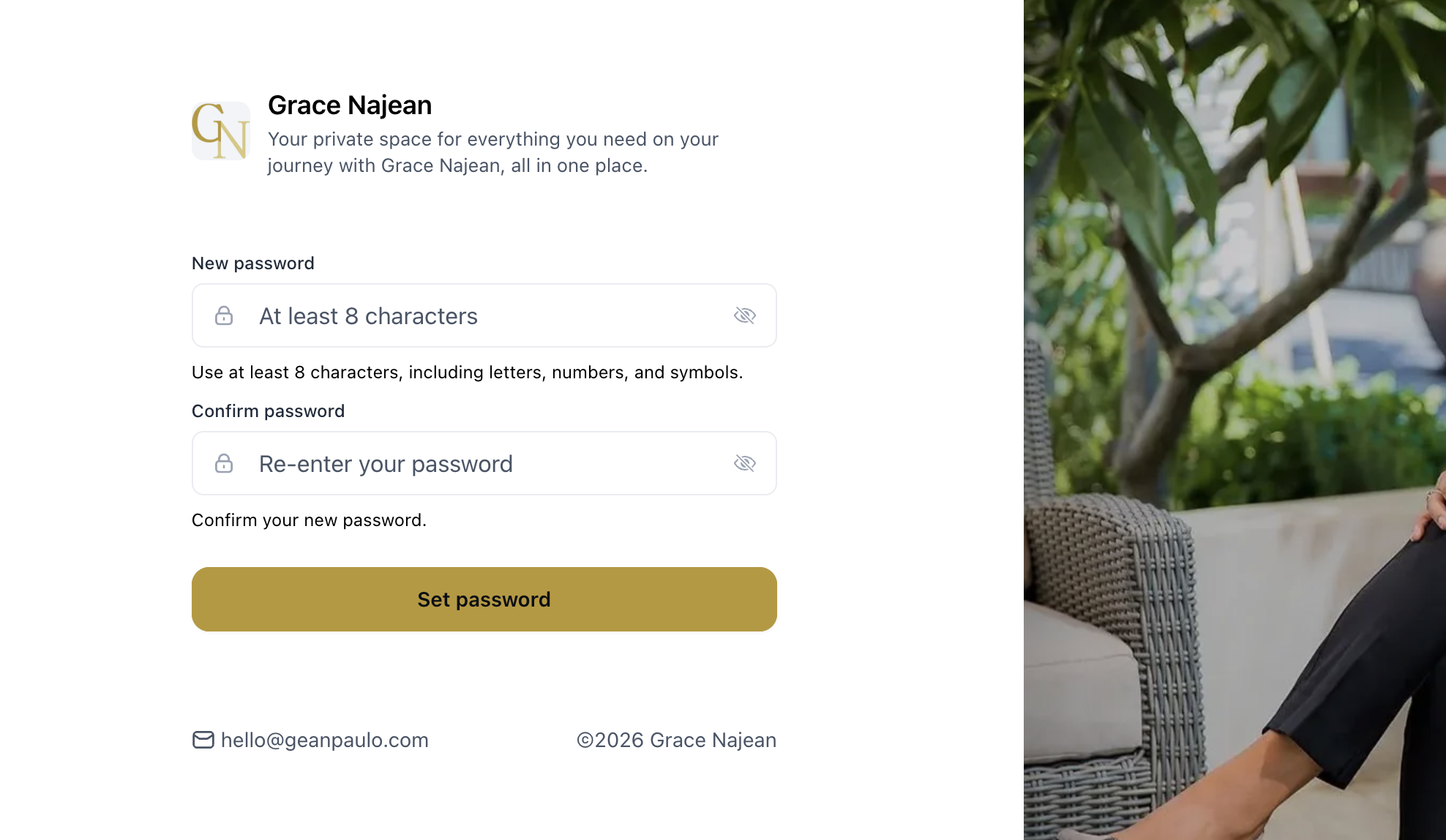
    Screenshot of the password setup screen
    You’ll use this password every time you log in from now on.
  4. You’re in

    Your dashboard opens with everything you bought. Click any product to open it — the ebook, the audio, the masterclass, and any bonus material.
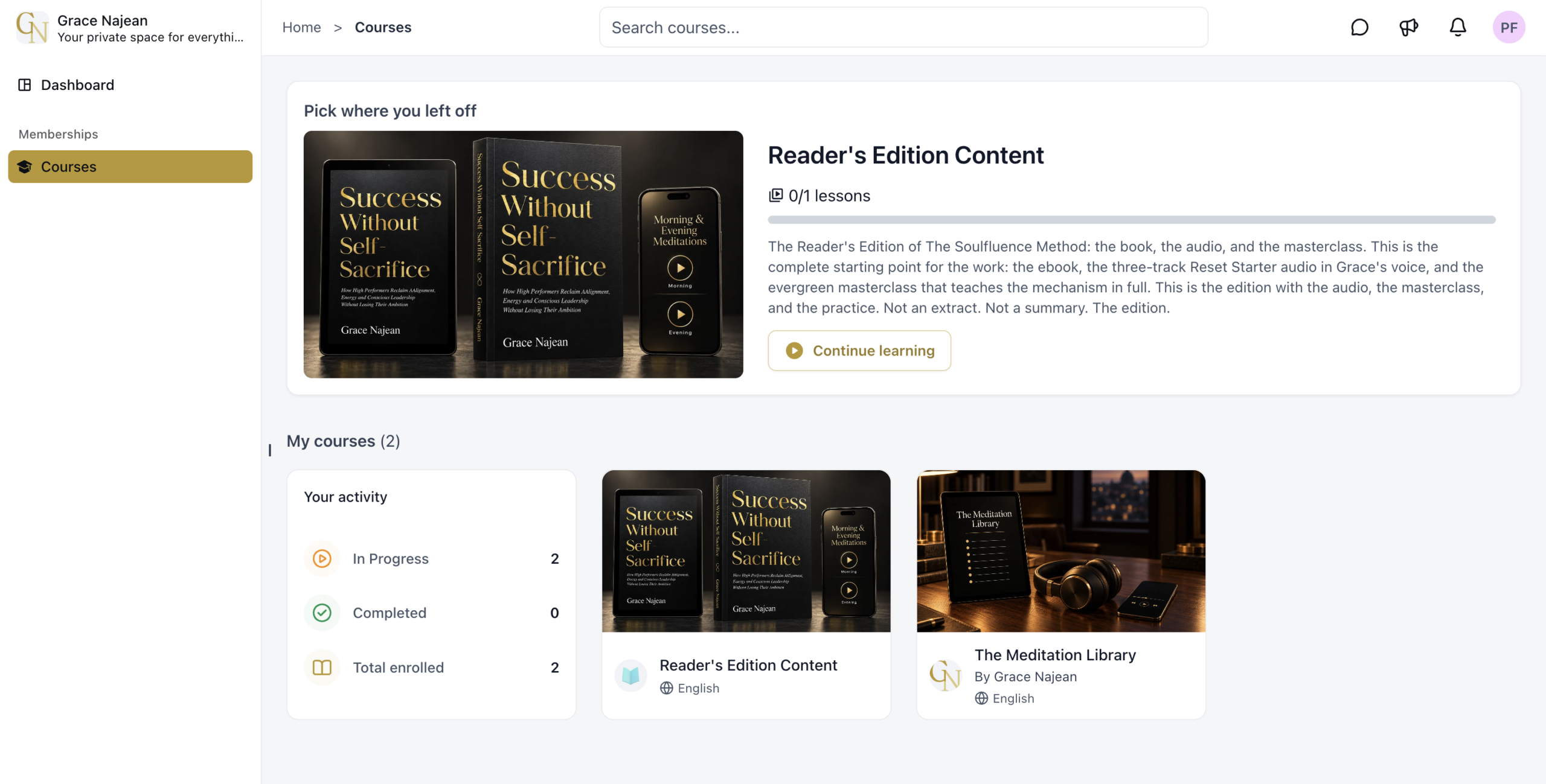
    Screenshot of the dashboard with your products
    Everything sits in one place, permanently.
×
Expanded view

What’s inside your dashboard

Depending on what you bought, your account will show some or all of the following. Each item opens with a single click.

  • The Ebook

    Success Without Self-Sacrifice, all 148 pages, readable in your browser or on any device.

  • Morning & Evening Meditations

    Two guided audio tracks, in Grace’s voice. One to start the day steady, one to put it down.

  • The Live Masterclass

    Live with Grace on Zoom on Tuesday 12 January for Australia and 13 January for the United States. Your workbook arrives on 4 January, and the replay is yours for 72 hours.

The email hasn’t arrived

It usually arrives within two minutes. If it hasn’t, work through these in order:

  1. Wait five minutes — delivery can lag, especially on first contact.
  2. Check your junk or spam folder for anything from hello@mail.gracenajean.co.
  3. If you use Gmail, check the Promotions and Updates tabs.
  4. Search your inbox for the word “password” — the subject line contains it.
  5. Confirm you used the same email address you paid with.

I bought more than one thing — where is it?

Every product you bought is attached to the same account. If you bought the book and a bonus or bump offer, you may receive more than one email — one per product. You only need to click one of them.

Once you are logged in, everything appears on the same dashboard. If you have paid for something and it isn’t showing, write to us with your order confirmation and we will attach it within a few hours.

Common questions

The password link has expired. What do I do?

Password links expire after 24 hours for security. Write to hello@gracenajean.com and we will send a fresh one, usually within a few hours.

I forgot my password. How do I reset it?

Go to the login page and click “Forgot password.” You’ll receive a reset link by email. If the reset email doesn’t arrive, use the steps in the Troubleshooting section.

Do I need a separate login for each product?

No. One email, one password, one dashboard. Every product you have bought is attached to the same account, even if you receive more than one confirmation email.

Where is the live masterclass, and what if I can’t make it?

Lead 2027 runs live on Zoom. The date, the time and the Zoom link are in your confirmation email, and the same details sit in the masterclass lesson inside your dashboard. If you can’t join live, the replay is yours for 72 hours.

Your Lead 2027 workbook arrives by email on 4 January, ahead of the masterclass.

Where is the 7-Week Inner Leadership Reset?

It sits in the same dashboard as everything else, as its own course. There is no separate login. If you bought the Lead 2027 Strategy Session, the Reset is included, so it should already be waiting for you. If it is not there, write to hello@gracenajean.com.

How do I book, or move, my Lead 2027 Strategy Session?

Your booking link and your Zoom link are in the session email we sent when you bought the Strategy Session. Use them any time to choose or confirm your time.

If you need to move the session, you can reschedule once, with 24 hours’ notice. If you have lost the email, write to hello@gracenajean.com and we will send the link again.

Can I download the ebook, or is it online only?

The ebook can be read in your browser and downloaded as a file. Once downloaded, it is yours to keep. If you can’t find the download option, write to us and we will send the file directly.

Where do I download the meditation library?

Everything is in the Attached Files section of the module. You will find The Meditation Library, which contains all nine practices in one file, plus individual downloads for each track if you only want one or two.

To keep the full library on your phone, open Attached Files, download The Meditation Library, then unzip it on your device. A computer or Wi-Fi connection is best for the full file.

Can I listen to the Morning & Evening Meditations on my phone?

Yes. Log in on your phone’s browser and the meditations will play from your dashboard. You can also leave the audio playing while you do something else. You don’t need to keep the page open.

Can I add the Lead 2027 Strategy Session later?

Yes. Write to hello@gracenajean.com and we will send you a link to add the Strategy Session to your existing account. There is no need for a new login.

Is the payment secure?

Yes. All payments are processed through a PCI-compliant gateway. We never see or store your card details.

Can I get a refund?

Yes, within 30 days of purchase, no questions asked. Write to hello@gracenajean.com with the email address you used at checkout.

I have a question that isn’t answered here. What do I do?

Write to hello@gracenajean.com. A real person reads every message, usually within a few hours, Monday through Friday.

Still stuck? Write to us.

Every email is read by a real person. Tell us what happened, which product you bought, and the email address you used at checkout — and we’ll sort it from there.

hello@gracenajean.com

Usually answered within a few hours, Monday to Friday.